

Create and edit with 3D Agent
Create objects, scenes and animations with Agent, then refine them in the editor.
Start with the browser Agent
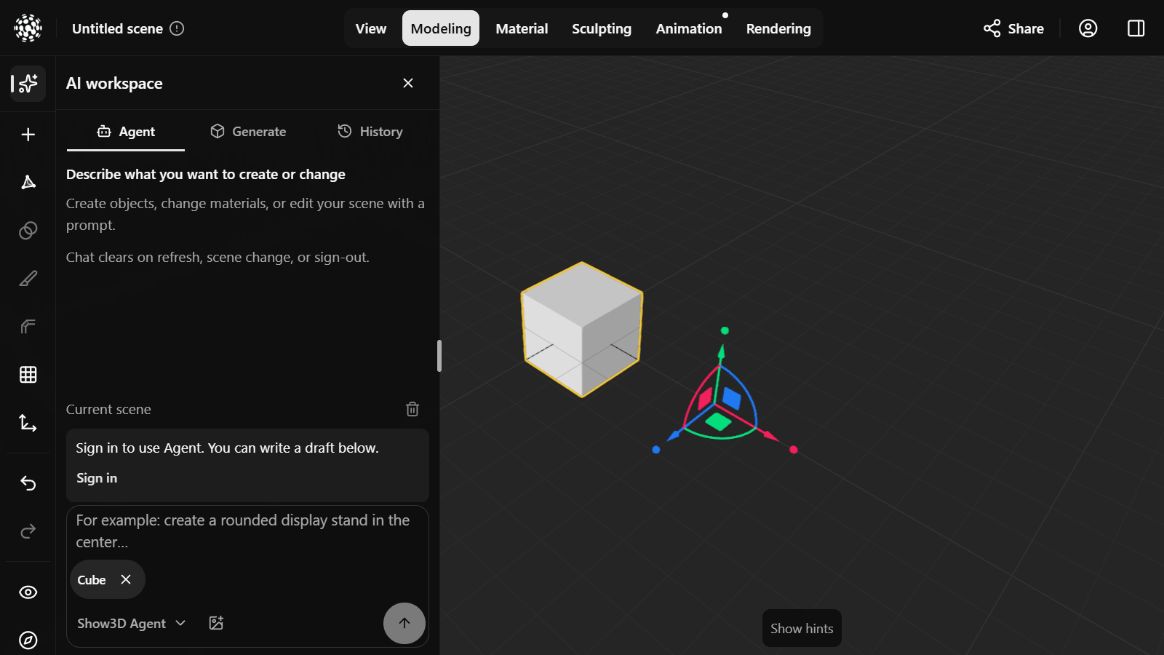
On the homepage, choose 3D Agent to start a new creation from a description, reference images, or both. The request starts when the new editor is ready. To work on an existing scene, open that scene and choose AI workspace → Agent → Show3D Agent. Sign in to send requests.
What you can create
Describe the result you want. Agent can build editable objects, arrange them into a scene, and author motion for those objects.
| Creation | What to describe |
|---|---|
| Objects | Shape, proportions, parts, colors and materials—for example, a chair with curved wooden arms and a fabric seat. |
| Scenes | The objects, their layout, spatial relationships and lighting—for example, a furnished room with a desk beside a window. |
| Object animation | Which parts move, rotate or change scale, how long the motion takes, and which parts stay still. Agent authors transform keyframes and their timing. |
Create, inspect, revise
Keep the Show3D editor open and give one clear creation task. Review the result in the scene before requesting the next change.
- Describe the object, shape, materials and spatial relationships. A selected scene object can appear as a reference in the composer.
- State what should remain unchanged, such as placement, dimensions or other objects. Attach reference images when useful; the composer shows supported formats, count and size.
- Send one clear task. Inspect geometry, materials and layout from multiple views before asking for the next change or adjusting it by hand.
Describe the object and its motion
When starting from the homepage, include what to build as well as what should move. Name the moving parts, specify a duration and say what remains stationary. For example:
Create a small desk fan with a blue base and three white blades. Keep the base and guard still. Animate the blades through one full turn in three seconds.
Write a focused revision request
In an existing scene with an object named Stand, identify both the requested change and what should stay in place.
Make the Stand twice as tall. Keep its base on the ground, preserve its width and material, and leave the other objects unchanged.
Keep control of the scene
Requests use the editor operations available to Agent. Inspect the result instead of assuming every constraint was met. Avoid editing the same part by hand while a task is running. Chats for saved scenes are stored in this browser for the signed-in account. Reopening the same scene restores its chat without restarting tasks. Drafts and queued requests are not restored; check scene saving separately before leaving.
When to generate an asset
Use text-to-3D or image-to-3D to create a starting asset. Use Agent or hands-on modeling to develop a scene and make deliberate changes. Inspect generated geometry before choosing an editing operation.
Connect Codex through MCP
To work from Codex instead, follow the setup guide and select Codex under Agent in the editor’s AI workspace. Use Connection and setup to connect the intended scene, then give Codex a modeling task. This connection is separate from Show3D Agent.